
Supported Windows systems using Windows PowerShell 5.1 or PowerShell 7 on Windows. Local System-log inspection and authorised remote event-log access; log availability and permissions apply.
Commands are reviewed against Microsoft documentation. The worked timeline is illustrative; it is not a captured production incident or an executed Windows test.Choose last boot or a historical investigation
My starting point is the question the incident needs to answer. If you need to know when Windows last restarted, read LastBootUpTime. If you need to explain repeated restarts, who requested one or what happened before recovery, collect the System-log sequence instead. Neither view is an application-availability report.
The first command is a local, read-only query. Run it on the Windows machine being investigated. LastBootUpTime is one current operating-system property, not a list of all previous boots and not proof of when the business service became usable. Sleep, hibernation and client power modes also make a simple boot timestamp a poor substitute for a service timeline.
Get-CimInstance -ClassName Win32_OperatingSystem -ErrorAction Stop |
    Select-Object CSName, LastBootUpTime
Collect a bounded System-log history
Capture the end time once, then work back seven days in this example. Get-WinEvent normally returns newest records first; sorting afterwards makes the selected sample easier to read chronologically. Preserve the machine, time zone, filter and result limit beside the output.
The IDs below are a discovery filter across the System log. Inspect ProviderName against the reference table before interpreting any row: the same numeric ID can mean something else under another provider. Keep informational events; filtering only errors would omit useful restart requests and startup markers.
The 500-record cap is for an initial inspection, not a completeness guarantee. If the result reaches the cap, narrow the period or deliberately review an uncapped query within a controlled interval. Sorting cannot recover records that were never returned. No matches, access denied and a missing log are different outcomes; do not hide them with blanket error suppression.
$end = Get-Date
$start = $end.AddDays(-7)
$events = @(Get-WinEvent -FilterHashtable @{
    LogName = 'System'
    Id = 12,13,41,1074,6005,6006,6008,6009,1001
    StartTime = $start
    EndTime = $end
} -MaxEvents 500 -ErrorAction Stop)

$events | Sort-Object TimeCreated, RecordId |
    Select-Object TimeCreated, MachineName, ProviderName, Id, RecordId, Message
Read the event ID and provider together
Treat these records as complementary evidence. A request to restart and a later startup are separate observations. The existence of a reason labelled Planned does not prove change approval, successful shutdown or application recovery; reconcile it with the actual maintenance record.
EventLog 6005 and 6006 describe the event-log service starting and stopping. They are useful supporting markers, but a service transition alone should not be treated as a definitive count of machine reboots. Kernel-General startup records and the surrounding sequence provide additional context.
Kernel-Power 41 is commonly investigated after the machine comes back. It establishes that the previous shutdown was not clean, rather than proving a failed power supply. A crash, a hang followed by a reset or loss of power can lead to similar evidence. A matching bugcheck record may direct the next investigation towards a dump; absence of that record does not prove hardware health.
| Event and provider | What it supports | What to check next |
|---|---|---|
| 12 / Microsoft-Windows-Kernel-General | Operating-system startup marker | Correlate with the shutdown sequence and service recovery |
| 13 / Microsoft-Windows-Kernel-General | Operating-system shutdown marker | Look for the request, change window and subsequent startup |
| 1074 / User32 | A process/account requested shutdown or restart | Read shutdown type, process, account, reason and comment |
| 41 / Microsoft-Windows-Kernel-Power | Previous shutdown was not clean | Correlate crash evidence, host/power events and the last known good time |
| 6008 / EventLog | Previous shutdown reported as unexpected | Read the prior shutdown time in the message; retain the record timestamp too |
| 6005 / 6006 / EventLog | Event-log service start / stop | Use as supporting context, not a reboot counter |
| 6009 / EventLog | Operating-system version information at startup | Correlate with Kernel-General and adjacent records |
| 1001 / Microsoft-Windows-WER-SystemErrorReporting | Bugcheck information when the matching record is present | Read the bugcheck and dump details; protect diagnostic files |
Find the process and account that requested a restart
Once you have a candidate time, query User32 event 1074 directly. This independent example inspects the latest 20 matching requests in seven days. Read the full message: shutdown type distinguishes a restart request from power-off, and the recorded process and account help identify the initiator.
A system account or management-agent process may have acted for an update policy or scheduled task. It is not automatically the identity of a person who approved the change. A request can also be cancelled or fail to complete, so confirm the later shutdown/startup evidence before calling it a completed restart.
Keep original fields alongside any interpretation. Avoid extracting the user by a fixed word position in Message: rendered messages vary by provider, event version and language. For automation, inspect the event XML schema on the actual supported environment before mapping named data fields.
Get-WinEvent -FilterHashtable @{
    LogName = 'System'
    ProviderName = 'User32'
    Id = 1074
    StartTime = (Get-Date).AddDays(-7)
} -MaxEvents 20 -ErrorAction Stop |
    Format-List TimeCreated, MachineName, ProviderName, Id, RecordId, Message
Build a timeline without inventing downtime
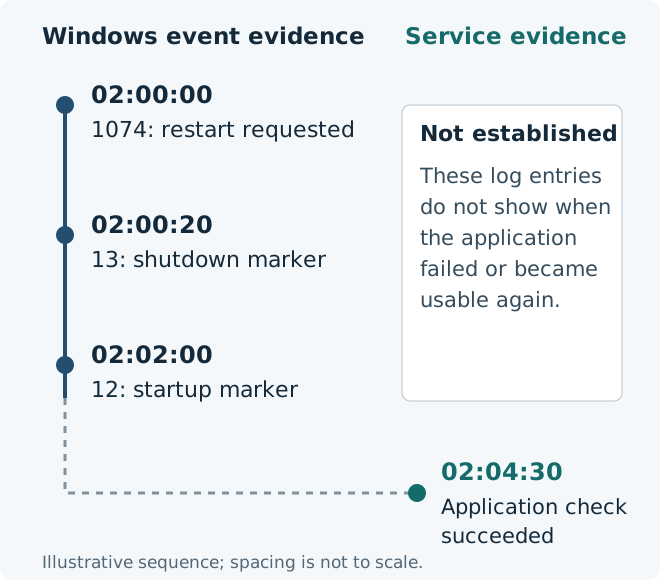
Consider a fictional maintenance sequence: a request at 02:00:00, a shutdown marker at 02:00:20, a startup marker at 02:02:00 and an independently observed successful application check at 02:04:30. The diagram separates those observations. It does not assert that all systems will emit this exact order or timing.
The request-to-startup interval is two minutes. The shutdown-marker-to-startup interval is one minute 40 seconds. Neither is measured business downtime: only an appropriate service check can establish when users lost and regained the required operation. In this example, application acceptance is four minutes 30 seconds after the request.
For an unexpected shutdown, the exact failure time may be uncertain. Event 6008 can report an earlier shutdown time inside its message, while its TimeCreated records when that event was logged. Do not substitute the later reporting time for the failure time. Keep host, UPS, hypervisor and application evidence separate until clocks and time zones have been reconciled.
One incident can produce 1074, 13, 12 and several EventLog entries. Counting every selected row as a restart inflates the total. If frequency matters, define the incident boundary, deduplicate by machine and evidence sequence, and document gaps in log coverage.
Windows startup and application recovery are separate observations
Export a review copy and preserve the original evidence
After the earlier $events query succeeds, export its objects rather than formatted console output. This example writes a new timestamped CSV in the current directory. It records both UTC and the displayed local timestamp with offset, retaining the provider, record identifier and message for review.
This is still the capped sample collected earlier. A CSV is a convenient review copy, not a complete event-log archive. Retain an approved EVTX export when the investigation needs original structured events, following the incident access and retention policy. Do not clear logs as part of collecting evidence.
Event messages can contain account names, internal paths or other sensitive details. Review sharing permissions and import untrusted message text as text when opening the file in a spreadsheet; exporting CSV does not neutralise formula-like content. Record the queried machine, interval, shell version, time zone and any errors in the incident ticket.
$path = Join-Path (Get-Location).Path (
    'reboot-history-{0}.csv' -f (Get-Date -Format 'yyyyMMdd-HHmmss')
)
$events | Sort-Object TimeCreated, RecordId |
    Select-Object MachineName, ProviderName, Id, RecordId,
        @{Name='TimeCreatedUtc'; Expression={
            if ($null -ne $_.TimeCreated) {
                $_.TimeCreated.ToUniversalTime().ToString('o')
            }
        }},
        @{Name='TimeCreatedLocal'; Expression={
            if ($null -ne $_.TimeCreated) { $_.TimeCreated.ToString('o') }
        }}, Message |
    Export-Csv -LiteralPath $path -NoTypeInformation `
        -Encoding UTF8 -NoClobber -ErrorAction Stop
Resolve gaps before closing the incident
Check the retained period before concluding that an older restart did not happen. Circular logs can overwrite old records, and a cleared or unavailable log can remove the evidence you expected. A capped query and an incomplete retained history are separate limitations.
Remote-access errors, missing message resources and a wrong provider filter also need different remedies. Preserve the original error and investigate that specific condition. If a message cannot be rendered, keep the original event data and inspect it on a suitable supported system; a blank message does not mean the event contains no data.
Close with the strongest supported conclusion and its next action: requested restart matched to an approved change; unexpected shutdown requiring crash or infrastructure investigation; or history unavailable pending log recovery. Verify the service separately. I would rather leave the cause explicitly unresolved than turn event 41 into an unsupported diagnosis.