

Internal IT support for a small organisation. Adapt the example targets to staffing, service criticality and agreed coverage; this operational template is not a negotiated supplier contract.
The sample targets and ticket scenarios are illustrative. Clock behaviour must be checked in the chosen service desk before the agreement goes live.Define the service before the deadline
Start with one service the team can describe and support: for example, employee access to managed laptops, business email and the approved office network. List the users, locations, supported devices and intake channels. Name a business service owner who can approve scope and a support owner who can allocate work.
Separate incidents from service requests and planned changes. A failed payroll login during processing is different from a request for a new account next month. Access requests still need approval; a short SLA must never become permission to bypass it. Keep a service catalogue for repeatable requests rather than forcing them all into an incident restoration target.
For a small team, the most damaging omission is often coverage. Write the timezone, working days, holidays, opening hours and urgent-contact channel explicitly. A mailbox receiving messages overnight does not provide overnight staffing. If critical incidents have an on-call exception, name the rota, activation method and backup contact; otherwise say coverage resumes at the next agreed opening.
Copy the internal support agreement
Download the editable worksheet and replace every bracketed field before approval. The same core fields appear here so the agreement can be reviewed without a download. Assign a version and review date, and keep the approved copy where users can find it.
This is a service-management starting point. If an external supplier contract, service credits, liability or jurisdiction-specific obligation is involved, obtain appropriate contractual review separately; do not infer those terms from an operational target table.
| Agreement field | What to record | Example or check |
|---|---|---|
| Scope and exclusions | Covered services, users, devices and locations | Managed endpoints and email; personal devices excluded unless agreed |
| Coverage and intake | Timezone, hours, holidays and channels | Monday-Friday 09:00-17:00 local service timezone; portal/email |
| Priority and ownership | Impact/urgency definitions, decision owner, deputy | Business impact determines priority, not requester seniority |
| Clock policy | Start, qualifying response, pause/resume and stop | No reset on reassignment; preserve change history |
| Targets and communication | Response, restoration objective and update interval | Use separate fields; do not promise a permanent fix at restoration |
| Escalation and dependencies | Named roles, triggers, vendor path and handover | Escalation retains an accountable ticket owner |
| Measurement and approval | Reports, exclusions, approvers and review date | Review breaches, reopens and user impact together |
Set targets the team can staff
The table is an illustrative starting point, not an industry standard or a recommendation to promise these times unchanged. All times below run only during the agreed support calendar. A team without enough cover for a 30-minute target must negotiate a different commitment or fund cover before signing it.
Response means a meaningful acknowledgement by the responsible support function: understood impact, an owner and the next update. An automated receipt is useful intake confirmation, but this agreement does not treat it as that response. Configure the service desk accordingly; a tool’s first-reply metric may have different channel or automation rules.
Restoration means the business task is usable again, possibly through an accepted workaround. Resolution means the agreed fix or fulfilment is delivered. Record both when needed. A restoration objective is a target to manage and escalate against, not evidence that a difficult fault can always be repaired within it.
| Priority and example | Response target | Restoration objective | Update interval |
|---|---|---|---|
| P1: critical shared service unavailable; no usable workaround | 30 support minutes | 4 support hours | Every support hour |
| P2: major team affected or key workflow seriously degraded | 2 support hours | 8 support hours | Every 4 support hours |
| P3: individual affected; workable alternative available | 8 support hours | 24 support hours | Each support day |
| Service request: approved new access or equipment | Agree acknowledgement separately | Use a catalogue fulfilment date | At approval, delay and fulfilment |
Make clock rules auditable
Write down when each clock starts. For this template, incident timing starts when the ticket reaches the supported intake channel; time outside coverage contributes zero support minutes. Record the actual arrival timestamp as well, so the out-of-hours wait remains visible. An urgent telephone report needs a ticket timestamp, not a later convenient data-entry time.
Pause only for a defined reason that matches the agreement and tool configuration. A genuine wait for essential requester information may pause a restoration clock if agreed; an internal transfer or an overloaded queue does not. Record the reason, dependency owner, start time and next review. Report elapsed calendar time alongside any paused support-time measurement so stalled work is visible.
Decide what a supplier dependency does before a breach. It may justify a separate internal/vendor objective, but it should not silently remove the customer-facing commitment. Keep communicating and escalating while the supplier works. Preserve the old priority, new priority, reason and remaining allowance when reprioritising; do not reset the timer by moving queues.
Test reopen behaviour. For example, if the same symptom returns within the agreed acceptance window, link it to the original ticket and report the reopen even if the tool creates a new SLA cycle. A green dashboard achieved through premature closure does not restore service.
Work through a Friday-to-Monday example
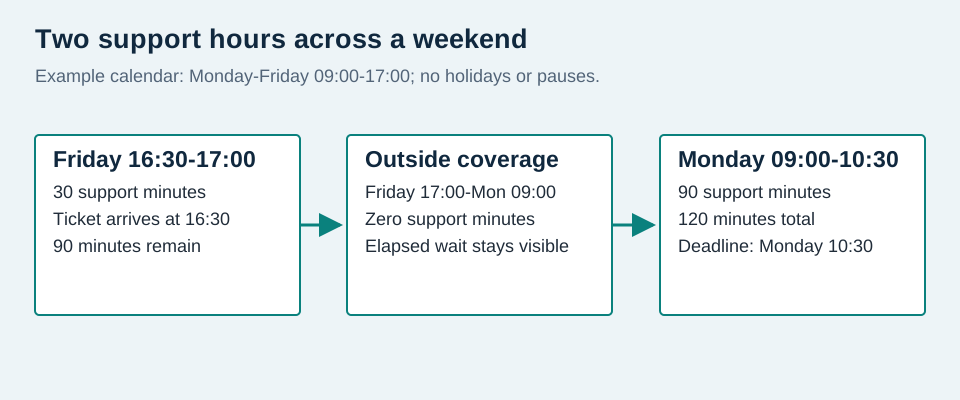
Assume support hours are Monday-Friday 09:00-17:00, no holidays, one service timezone, no pauses and a two-support-hour response target. A ticket arrives Friday at 16:30. It consumes 30 minutes on Friday, then resumes Monday at 09:00. The remaining 90 minutes make the deadline Monday at 10:30.
A meaningful response at Monday 10:15 uses 30 + 75 = 105 support minutes and meets the 120-minute target by 15 minutes. The same interval is 65 hours 45 minutes of elapsed calendar time. Report the chosen metric explicitly; do not describe this as a response within two elapsed hours.
If Monday is a configured holiday, the remaining time moves to the next covered day. If the service calendar changes timezone or crosses daylight-saving changes, test the stored timestamps and local display. Avoid manual calculations based on an assumed fixed UTC offset.
Escalate before the user has to chase
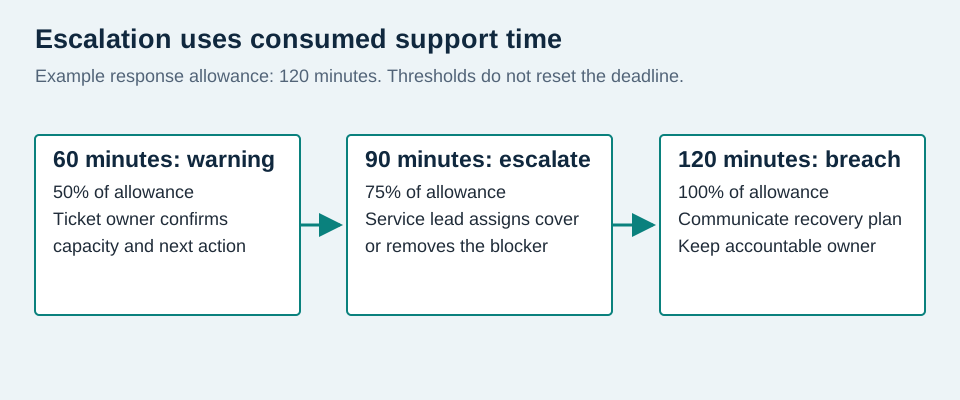
Choose an early warning threshold that gives the next owner time to act. In the example policy, notify the current owner at 50% of the response allowance and the service lead at 75%. These are suggested operating triggers, not measured performance or compulsory tool features.
For a two-support-hour response target, those warnings fall after 60 and 90 consumed support minutes. In the Friday example they fall Monday at 09:30 and 10:00. The breach point remains 10:30. An escalation message must identify impact, work done, remaining time, required decision and who owns the next update.
A one-person IT function needs a deputy or an agreed reduced service during absence. Escalating repeatedly to the same unavailable person creates noise rather than cover. Document the business decision-maker who can authorise a workaround, external support or a temporary change of service level.
| Trigger | Accountable action | Required record |
|---|---|---|
| At agreed warning threshold | Ticket owner confirms next action and capacity | Impact, time remaining and next update |
| At escalation threshold | Service lead assigns cover or removes a blocker | Named accepting owner and decision |
| At breach | Owner informs stakeholder and agrees recovery plan | Reason, revised expectation and communication |
| After restoration | Service owner reviews avoidable delays | Cause, corrective owner and follow-up date |
Test the policy before publishing it
Run a small acceptance set: an ordinary in-hours ticket, one arriving just before close, one on a holiday, a valid wait, an internal reassignment, a priority change and a reopened incident. Compare expected clock minutes with actual tool behaviour and retain the results with the agreement. A saved configuration alone is not proof the policy measures what you agreed.
Check whether the intended first-reply event is public or private, whether automation can satisfy it, and which waiting states pause which metric. Atlassian documents configurable start, pause and stop conditions; Zendesk documents channel-specific first-reply behaviour. The conceptual policy transfers between tools, but the exact implementation does not.
Review met versus breached targets by priority with denominators, paused time, reopens, oldest open work and business impact. If 18 of 20 eligible P2 response cycles meet their target, attainment is 90%; report the two misses and sample size. Do not mix response attainment with restoration attainment or remove difficult tickets without an explicit exclusion rule.
Use the first month to identify staffing or scope problems, then agree changes with stakeholders. Preserve the old version and effective date. Changing a target prospectively is a governance decision; rewriting old deadlines to improve a historical report undermines the agreement.
Next step: agree the policy, then choose the tooling
Complete the scope, calendar, owner and escalation fields first. Approve targets the team can cover, test sample tickets and publish one clear agreement. Choose a help desk for its ability to implement those rules, report exceptions and preserve an audit trail; a faster advertised feature list cannot compensate for an undefined support promise.