

Vendor-neutral operational guidance for authorised maintenance in small IT teams. Product examples identify the documented behaviour and version, rather than interchangeable settings.
The scope matrix, timings and worksheet are illustrative planning examples. Validate suppression and delivery in a controlled test for your installed monitoring version before production use.Decide what the window actually changes
A maintenance window is a controlled exception to normal operations. The change record authorises the work; the monitoring configuration determines which signals reach people during it. These are separate decisions. Booking an outage in a calendar does not prove that monitoring is muted, and muting a host does not authorise an outage.
Prefer notification-only suppression when the monitoring platform supports it and continued observation is useful. If collecting data would itself disrupt the work, document the expected evidence gap and an alternative way to assess recovery. Do not describe missing samples as healthy samples.
Keep planned activity separate from incident response. An unexpected failure outside the agreed scope still needs investigation. If the work creates unplanned customer impact, follow the incident process alongside the change rather than extending a silence merely to avoid pages.
Distinguish suppression from disabled monitoring
Names such as maintenance, pause, mute and disable are not portable between tools. Before using one, establish which layer it changes: collection, rule evaluation, event visibility, notifications or automated actions. A setting that suppresses a message may leave every other layer operating.
| Control | Intended effect | Check before use |
|---|---|---|
| Notification silence | Stop matching notifications for a bounded interval | Telemetry and evaluation still behave as intended |
| Disabled collection or rule | Remove a source of observations or evaluation | Evidence gap, restoration owner and catch-up behaviour |
| Dependency inhibition | Suppress secondary notifications while another alert is active | Correct parent signal and independent failures remain visible |
| Reporting exclusion | Apply an agreed availability-reporting rule | Contract, service scope and calculation are separately approved |
Define a narrow matching scope
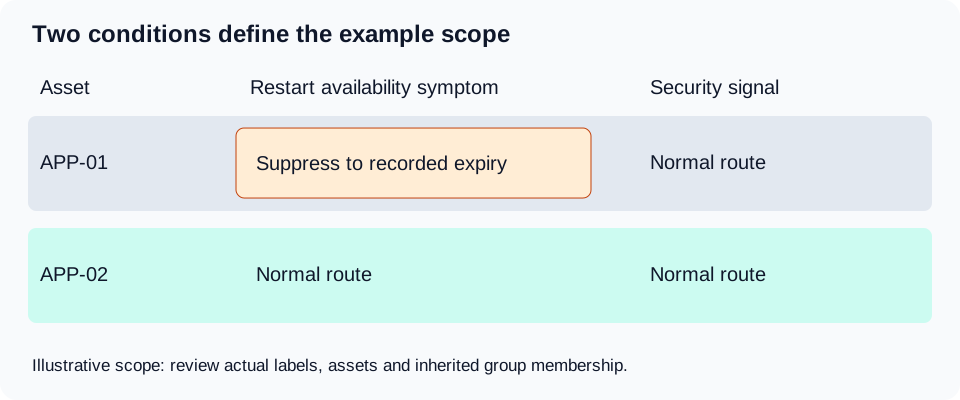
Start with the exact service, environment, tenant and assets affected. Then list the symptoms the change is expected to cause. For a planned restart of APP-01, service-unavailable alerts for that host may be expected; a backup failure on another host or an authentication outage across the estate is not.
Prefer explicit asset identifiers or a reviewed group with known membership. Broad regular expressions and dynamic labels can pull unrelated systems into the window. Inspect the resolved match set immediately before work starts, particularly if discovery or group membership changes automatically.
Record one excluded canary: an unaffected check that must still reach the duty responder. This gives the team a concrete way to distinguish narrow suppression from an accidental global mute. Use an approved test signal and consented recipients, not a real production fault.
Write the minimum window record
Use one change identifier to connect approval, the monitoring exception and recovery evidence. State the timezone and full start and end timestamps, not simply “Sunday evening”. For recurring windows, review daylight-saving behaviour and the intended local business time.
Specify the owner and deputy, affected assets, matching rule, expected symptoms, remaining coverage, stop conditions and the person who can approve an extension. Add the previous configuration or a supported removal method. Avoid relying on the monitoring platform alone to remind you that its own alerts are muted.
| Field | Illustrative entry | Acceptance question |
|---|---|---|
| Change and owner | CHG-104; duty administrator; named deputy | Who can stop the work or approve an extension? |
| Scope | Production APP-01; expected restart-related availability alerts | Which matched assets and alerts were previewed? |
| Timing | 22:00 to 22:45 UTC on the recorded date | Does the platform use this timezone and expiry? |
| Coverage retained | APP-02 availability; telemetry review; security response | Who watches unexpected impact? |
| Exit evidence | Fresh samples, application checks and delivery test | What proves normal monitoring has resumed? |
Check your platform rather than translating the label
Prometheus Alertmanager silences use matchers and an active time interval to prevent matching alert notifications. Inhibition instead depends on another alert being active. A silence at this notification layer is not an instruction to stop Prometheus collecting metrics. Review the actual labels arriving at the Alertmanager, not only the labels you expected in the change record.
Grafana documents that silences stop notification creation without stopping rule evaluation. Its silences apply to a particular Alertmanager. Recurring mute timings and fixed start/end silences are different mechanisms. Check that you configured the Alertmanager actually responsible for the affected alerts.
Zabbix 7.4 distinguishes maintenance with data collection from No data collection. With data collection, triggers and events continue; pausing problem escalation depends on the action setting for suppressed problems. No data collection does not mean agents or proxies necessarily stop collecting: the server ignores that data. Recovery and update operations have separate behaviour. Check your installed-version manual and action rules before assuming silence or recovery-message delivery.
These examples describe different products, not equivalent instructions. Use a small test scope to confirm what is retained, hidden, deferred and sent when the window starts and ends. Do not copy a setting name from another platform and assume it has the same effect.
Work a timed example with a genuine stop point
Consider an illustrative change with a 22:00 to 22:45 UTC notification window. The planned restart finishes at 22:20 and the operator reserves ten minutes for service checks, aiming to complete acceptance by 22:30. That leaves fifteen minutes before automatic expiry; it is planning headroom, not permission to stop watching.
At 22:30, an application check still fails. The owner must decide whether to roll back, invoke the incident process or request a bounded extension under the change policy. Leaving the original expiry untouched while assuming someone else will extend it is not a plan. Extending indefinitely until the dashboard looks quiet is worse.
If an extension to 23:00 is approved at 22:35, record its reason, approver and revised stop conditions before changing the schedule. The total notification window is then sixty minutes, fifteen longer than the original forty-five. Keep the actual outage timeline separate: a sixty-minute silence does not establish sixty minutes of downtime.

Verify both a matched and an unmatched signal
Before a production window, exercise the rule in an approved test environment or narrowly scoped test service. Confirm one expected matching signal is suppressed and one unaffected signal still reaches the intended receiver. Check the monitoring event record as well as the inbox: absence of a message alone cannot identify which layer failed.
Verify timing, permissions, group membership and the audit record. If automatic remediation is attached to alerts, check its behaviour separately; muting a message does not necessarily stop a restart or script action. Use harmless test conditions rather than triggering a destructive action to see whether it runs.
For a new platform or changed routing configuration, include a test of expiry and re-notification. Determine what happens to a fault that begins during maintenance and remains active after it. Delivery may depend on evaluation intervals, grouping, repeat timers, action conditions and state transitions. Do not promise an immediate page at the expiry timestamp without testing the configured path.
Keep an observer during the work
Assign someone to review the retained health evidence and business service checks while the change proceeds. In a very small team the implementer may also observe, but name the deputy and agree how an independent user-impact report reaches them. A silent phone is weak evidence when the phone is deliberately being silenced.
Compare expected effects with actual scope. A reboot on one node should not silently excuse failure across its redundant peer. Stop or escalate if impact spreads, recovery steps fail, the observer loses telemetry or the remaining coverage no longer matches the risk accepted in the change.
Retain the original event timestamps and relevant logs through the approved retention policy. A maintenance flag can change how an event is displayed without changing when it happened. Avoid deleting the uncomfortable events to make the post-change report easier to read.
Close only after monitoring and the service recover
Confirm current data timestamps, expected polling or ingestion, application-level operation and the status of all in-scope assets. An old green value can remain on screen while a collector is broken. Check freshness as well as value, and give missing assets explicit owners.
Remove or expire the exact exception and read back the effective configuration. Check for overlapping recurring windows, inherited group maintenance and separate notification-policy mutes. Removing one silence is insufficient if another still matches the same service.
Run an authorised delivery check through the normal route after the exception ends. Confirm the actual recipient and record the result without generating repeated test pages. Reconcile unresolved events into incidents or follow-up tasks; acknowledge is not the same as resolve, and service recovery is not the same as completing the change record.
Download the maintenance-window worksheet
The editable worksheet captures scope, timing, retained coverage, authorisation and exit evidence. It includes matched/unmatched test results and a separate field for actual service impact. Replace the illustrative entries before using it as an operational record.
Store completed records in the approved documentation system. Include the change identifier in the monitoring exception, keep sensitive contact details access-controlled, and link to the final incident or change evidence rather than copying credentials into the worksheet.
Review exceptions without hiding reliability problems
Report actual service impact, the suppression interval and any contractually valid reporting exclusion as separate facts. Whether planned downtime is excluded from an availability commitment depends on the agreement and its calculation rules. The presence of a maintenance flag alone settles neither.
Review windows that overrun, match too broadly or leave faults undiscovered. For recurring activity, check that the schedule still corresponds to real authorised work. A recurring mute can outlive the job it was created for and hide a genuine failure every week.
If your current monitoring cannot preview scope, preserve useful evidence or demonstrate notification recovery, include those specific requirements in your next tool evaluation. Compare the operating model and the team effort as well as the feature label.