
Internal IT teams and small MSPs defining authorised support escalation. Example timings are design choices, not contractual promises or universal service targets.
The matrix and incident timeline are illustrative operating examples. Validate contact coverage, notification behaviour and authority with a controlled exercise before adoption.Escalate for the right reason
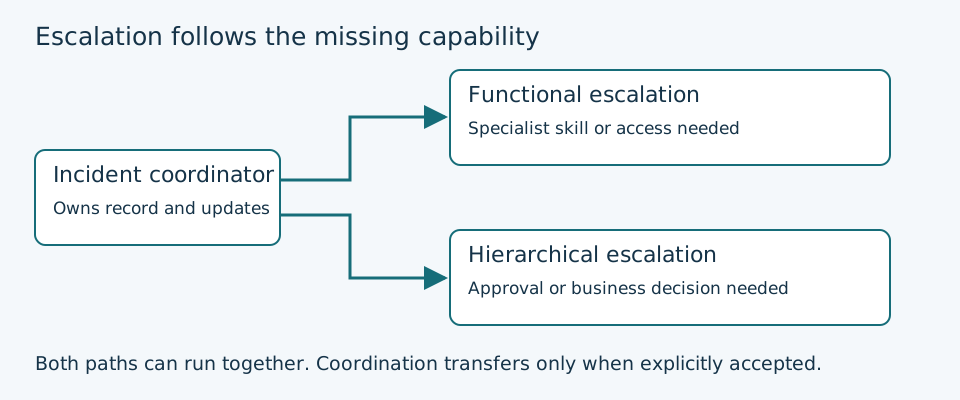
Escalation brings in the expertise, authority or availability needed to move an incident forward. It does not mean every difficult ticket must travel through three increasingly senior people. A two-person team may need a service owner and an external support contract rather than invented L1, L2 and L3 departments.
Use functional escalation when the next person has the necessary skills or access. Use hierarchical escalation when someone must authorise expenditure, a disruptive recovery action or a business trade-off. Automatic escalation is a notification rule for an unmet condition, such as no acknowledgement. It can support either path, but a delivered notification does not prove a human has accepted the work.
For suspected compromise, data loss or a major outage, invoke the appropriate incident process immediately. Do not exhaust routine troubleshooting first or wait for a timer to expire. Keep evidence and sensitive details in the approved incident record, with access limited to the people who need it.
Build the matrix around services and decisions
Start with services that matter to the organisation: identity, connectivity, line-of-business applications, endpoints and recovery systems. For each, name the responsible role and the person currently covering it. Link roles to an access-controlled contact directory rather than publishing personal telephone numbers in a widely shared worksheet.
The example below is a starting structure. Replace every placeholder, obtain agreement from the owners and confirm that external support actually covers the product, hours and severity. An MSP contract does not automatically include every tenant, application or out-of-hours incident.
| Service or trigger | Primary and backup | Escalation destination | Acceptance evidence |
|---|---|---|---|
| User endpoint issue within support hours | Service desk; duty technician | Endpoint specialist if scope or access exceeds the desk | Named responder accepts in the ticket |
| Identity outage affecting multiple staff | Duty administrator; nominated backup | Identity specialist and incident lead in parallel | Incident lead named; technical owner confirms task |
| Business application unavailable | Application owner; deputy | Vendor support under the verified entitlement; business owner for decisions | Vendor case ID plus internal owner |
| Restore or disruptive recovery proposed | Recovery lead; deputy | Service owner approves impact; specialist performs authorised recovery | Recorded approval and accepted recovery task |
| Primary responder does not acknowledge | Current on-call role; secondary rota | Backup responder, then agreed duty manager fallback | Explicit acknowledgement with timestamp |
Specify triggers before choosing timers
Write triggers as observable conditions. Examples include no acknowledgement, impact expanding beyond one team, a required privilege the responder lacks, an external dependency, or a recovery action beyond delegated authority. “Escalate if necessary” gives the operator no usable decision rule.
Keep acknowledgement, progress review and restoration targets separate. Acknowledgement means someone has taken responsibility; it does not mean service has returned. A ticket can be acknowledged promptly yet still need a specialist, a manager decision and regular progress reviews.
Use the same clock definitions as the support agreement. State the timezone, support calendar, holidays, start event and any authorised pauses. For critical services, decide explicitly whether coverage is continuous. Never promise round-the-clock response from a rota that only covers office hours.
Work through a missed-acknowledgement example
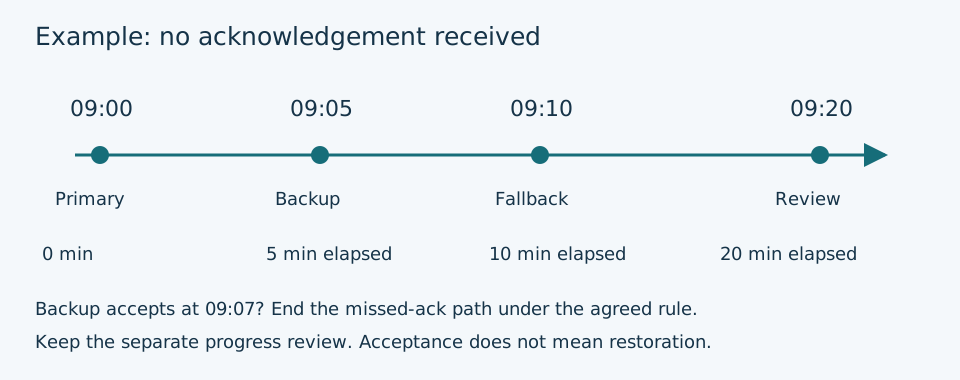
Assume a covered service uses a deliberately illustrative five-minute primary acknowledgement window and a further five-minute backup window. At 09:00 an incident is raised. The primary has not acknowledged by 09:05, so the backup is notified. If nobody accepts by 09:10, the agreed duty manager fallback is invoked. The incident still needs an owner; reaching the final step is not a resolution.
If the backup accepts at 09:07, the missed-acknowledgement path can stop according to the configured rule. A separate progress review at 09:20 still checks impact, next action and whether specialist help is needed. Do not assume acknowledgement disables every other timer in a chosen tool. Check acknowledgement expiry, repeat rules and re-notification separately.
This example covers elapsed minutes during an agreed coverage period. It is not a recommendation for every priority. Choose windows that people can meet and that leave enough time for investigation and recovery before the relevant service target.
Keep one coordinator while specialists work
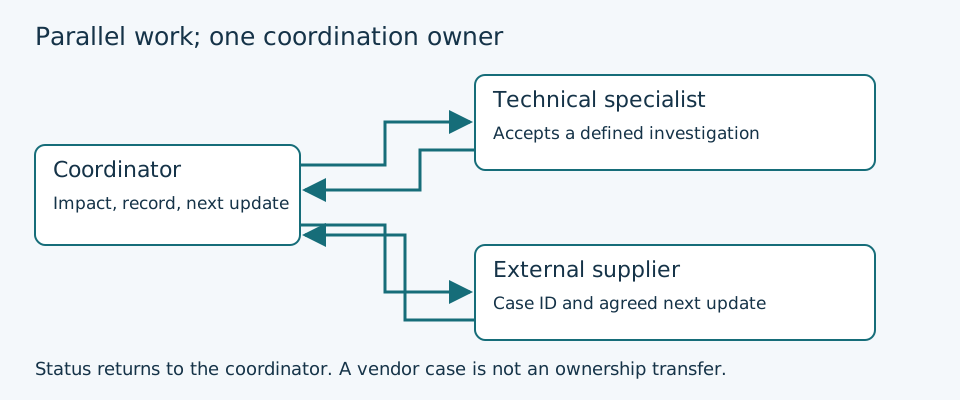
Assign one incident coordinator who maintains the current impact, next update and outstanding decisions. Specialists can work in parallel without creating competing ticket owners. In a small team, one person may coordinate and investigate, but their deputy and decision limits should still be explicit.
The current coordinator retains accountability until a named replacement explicitly accepts it. Record the time, recipient and next review point. Sending a message, assigning a queue or opening a vendor case is insufficient evidence of an accepted handoff. If acceptance fails, follow the fallback and keep coordinating.
A supplier ticket adds a dependency; it does not transfer your responsibility to communicate with users. Record the vendor case reference, severity and next promised update. Keep an internal owner who can challenge a stalled case, find an alternative recovery path or ask the business owner for a decision.
Use a concise handoff packet
Make it possible for the next responder to act without repeating the first fifteen minutes of investigation. Include the service and environment, impact and start time, priority with rationale, symptoms, relevant changes, safe checks already completed, current hypothesis and the specific help or approval requested.
Add the next update time, any recovery deadline and the existing ticket or incident identifier. Provide approved links to logs and evidence instead of pasting passwords, access tokens, personal data or complete production datasets into chat. Separate observed facts from assumptions.
A useful acceptance message is specific: “I am taking the database investigation under incident INC-104; you remain coordinator; I will update at 10:30.” A full ownership transfer should state that the recipient is taking coordination too. Record the agreement in the incident system so a shift change does not erase it.
Make the fallback work outside normal hours
Check the actual rota for holidays, sickness, travel and shift changes. A backup who shares the same unavailable phone, network path or unsupported hours is not a reliable fallback. Where the team has no contracted out-of-hours cover, document the business risk and the approved route rather than silently adding colleagues to an informal unpaid rota.
Keep emergency contacts available through an authorised alternative if the ticketing platform or identity provider is unavailable. Protect that copy, minimise personal data, assign an owner and test access. A dependency on the failed sign-in service can make a perfect-looking escalation chart unusable.
For MSPs, record which customer can authorise an outage, additional spend or a recovery decision. Confirm the customer contact and deputy before an incident. Use the contracted support channel and severity definitions when escalating to a vendor; do not publish a private partner hotline as a general support route.
Download and complete the worksheet
Use the editable worksheet to capture service ownership, trigger rules, coverage, handoff acceptance and a short exercise record. Store the completed version in the approved documentation system and link it from the service record. The downloadable version contains role placeholders only.
For each critical service, walk through one missed acknowledgement, one unavailable backup and one specialist handoff. Include a scenario where the normal ticketing or identity service is unavailable. Use a test incident and consented notifications; do not trigger a production outage to prove the matrix works.
| Exercise | Expected result | Record before sign-off |
|---|---|---|
| Primary unavailable | Backup receives and explicitly accepts the test incident | Notification time; acceptance time; actual recipient |
| Backup unavailable | Fallback reaches an authorised decision owner | Coverage gap and agreed remediation |
| Specialist assistance | Technical task accepted; coordinator remains clear | Accepted task; coordinator; next update |
| Support platform unavailable | Approved alternate contact and record remain reachable | Access method; authorised users; reconciliation owner |
| Shift handover | Incoming coordinator explicitly accepts ownership | Transfer time; outstanding risks; next review |
Review the matrix after incidents and staffing changes
Review coverage when staff, suppliers, services or support entitlements change. After an incident, ask whether the right person was reached, whether the acceptance was clear and whether a decision was delayed. A shorter notification interval will not solve a missing skill or absent authority.
Track missed acknowledgements, unaccepted handoffs and time waiting for a decision separately from restoration time. Use the findings to improve coverage and permissions, not to imply that every delay belongs to the first responder. Keep the contact directory current and remove obsolete access through the normal staff lifecycle process.
Put the matrix into the ticket workflow
Choose one important service, agree its roles and fallback, then run a controlled exercise before rolling the matrix out more widely. Keep the matrix short enough to use during an incident and detailed enough to identify the next person and the exact decision required.
An escalation matrix works when the incoming responder accepts a defined task and the team knows who is still coordinating. Connect that rule to your ticket workflow so notifications, specialist work and user updates remain part of one incident record.